How to publish RD Web & Gateway (2008 r2) on ISA 2006, and still have time to watch The Big Bang Theory!
 So I was asked the question, how do You publish the new Windows Server 2008 and 2008 R2 editions of Terminal Server, including the RD Web and RD Gateway (GW) services. And on top of that still use the ISA 2006 as authentication with Forms Based Authentication (needed in this case for RSA keys). Sounds easy enough right? Wrong!
Well once You get your head wrapped around the limitations, which of course are always hard to find documentation on, then it is easy enough. Basicly the RD Web service is easy enough to get working, simple next next next, will get You there with little trouble.(The RD Gateway on the other hand…)
Configure a ISA 2006 rule, with relevant web listener (or existing if appropiate), allow the /rdweb/* paths, use FBA authentication, use NTLM delegation of authentication to the internal webserver, configure the webserver (RD WEB) to use NTLM, install relevant SSL certificates to ISA and webserver, and presto it works! It even works with SSO if needed, and the user is only prompted by the ISA forms and not a second time by the RD Web site.
So far so good! A small hint before we go on, if You want to add multiple connections to other Terminal Servers in the RD Website,  just create your RDP files, and sign them using the servers SSL certificate and place them in the relevant folder on your RD Website. Then the tricky part, You need to add the name of the RDP file in a registry key on the RD Web server. Then it all works – if You would like more info on this, leave a comment and I might just write some more details on this.
Now the RD Gateway server, I was expecting I could just add it to the same listener, use the same authentication, use SSO to avoid getting second login prompt, and then presto? Wrong!
The RD GW server is basicly just an RPC Proxy, that translate the clients rdp/rpc over https connection into an RDP connection for the internal RDP Server, so theoretically it should be easy to add some type of authentication to the web part of the connection. Unfortunately that is not possible, any type of authentication in the RPC/HTTPS stream will kill the connection. Personally I tried with any combination I could imagine, including FBA/HTTP Authentication, Basic, Integrated, Digest, Delegation, No delegation, etc. The client will either complain that the terminal gateway server is unfortunately unavailable at the moment or even worse just repeat the login prompt continously for ever.

So after extensive research (Google is my friend!), I came to the conclusion that all of the technet, MS blogs, various articles, and MS Scripts regarding ISA 2006 and Terminal Server Gateway services for Windows Server 2008 (R2), that always mentioned recommended and supported configurations, all used no authentication on the ISA 2006 server and then secondly allowed the client to authenticate directly on the RD Gateway server. At first I find this weird, I even found an article with an ISA MVP describing how to setup the rule, with Basic Authentication – cool! Finally I found a way, but no after some testing and further examination of the blog article, I noticed after all of that authentication configuration he set users to “All Users”, even if it looks safe with Basic Authentication over SSL – that little setting at the end, meant ISA was never authenticating anything.
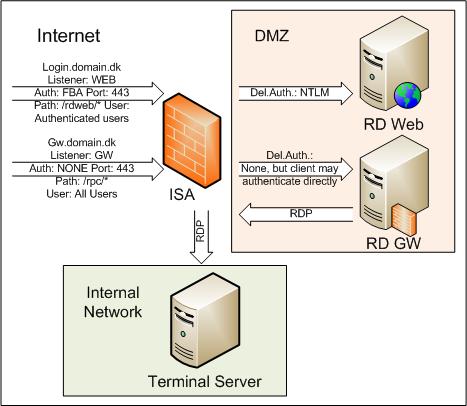
So I have come to the final conclusion, Microsoft have designed it like this. User connects to RD Website thru ISA and can authenticate either on the ISA or the actual RD Website, the RD Website is located in the DMZ so no hard feelings there. Then secondly the user is directed to a RD Gateway server, thru a RDP initiated RPC/HTTPS connection, the RD GW server is also located in the DMZ, so they use that for the authentication, and never needed the ISA server to authenticate. Only when the RD GW server allowed the connection, would it open a connection to the internal server and network, with RDP.
In this setup, the client is never allowed further than the DMZ. The only ones doing any connections to the internal network is the servers in the DMZ.
Enough with the ramblings, basicly it means that anyone using SSO on the ISA server (should be possible to do full SSO on 2008 R2 by using only the authentication on the RD Web and RD Gateway servers), will need to allow external un-authenticated connections thru the ISA server and to the RD Gateway server. In it self this should not be a problem, however if as in this case, You use RSA keys to authenticate on the ISA server, You no longer have the option of closing the RD GW from outside connections without RSA keys (client can open RDP them self and manually connect to the GW directly without using the RD Web).
So my setup requires, one listener for the login.domain.dk website, using FBA authentication, with NTLM delegation to the RD website. A second listener for the gw.domain.dk website on the RD GW server, using No authentication, with delegation set to None, but client may authenticate directly. Dont forget to setup SSL certificates! – personally I would recommend a GlobalSign Domain Validated SAN certificate, with the two FQDN’s in it. (that way You have included license in the price for 3 servers)
I have attached a visio design draft of my setup.

Feel free to comment, snipe, steal, link or add information if You have it!
 Posted in ISA 2006, Microsoft, Security, Windows Server 2008 |
  Tags: FBA, Forms Based Authentication, ISA, Microsoft, RPC over HTTPS, Terminal Server, Windows Server, Windows Server 2008
Hi mate
This has been driving me up the wall. I am trying to RSA authenticate using the public facing ISA server with forms then pass through to the RDweb server (which is on my domain not in the DMZ). I get through to the RDWeb server but then cannot connect through to the terminal servers on our network due to the ‘gateway is unavailable’ message. Could you explain the adding the RDP file to a reg edit?
Hi Ryan,
I do not think the registry and editing of the RDP is what youre looking for. And I can’t remember the location, might take a look on a server if that is realy what You need?
How are You authenticating and delegating authentication on your ISA to your remote desktop gateway servers? That would be the obvious place to get such an error.
Hi Sole,
What’s the point in protecting RDweb server with 2factor authentication if your users can connect to gateway/session host with just username/password?
Hi Bartek,
From a security point of view, the 2 factor authentication is not increasing security since it can be bypassed by going directly to the gateway.
But in this case at least, it is a requirement, since the login session is part of a Single Sign On for other internal websites and services.
Also the user experience is what they expect.
If the firewall was able to use the authenticated session on the RD Website, to allow the rule for the gateway to the authenticated user, it would be a security benefit. (some firewalls can do this)
Hi Sole,
I like to add multible connections on my web access page for some Remote Desktop Server. What i have to do?
kind regards
Gino
I am not sure I understand the question, sorry.
Do you want icons for remote desktops added on the web page?
Hi Sole -I’m stuck on two points. The /rdweb/* path with the matching auth still doesn’t get me past the RD Web signon form, even though the RDWeb site is set for Windows auth. The RD Web form still comes up after a successful auth. from the ISA listener.
Further, having two listeners on the same port and same ip address is not possible.
The error message:
The port and IP addresses specified in a web listener cannot overlap with the IP addresses and ports specified in another Web listener already used in a different rule.
regards,
Ron
Hi Ron,
First the easy answer, you are correct two listeners can not listen on the same IP and port. You will need two public IP addresses with different addresses (FQDN’s) pointing to them. Otherwise you need to make only one listener that is not using Forms Based Authentication (FBA) as one of the services does not work with this.
Regarding your authentication problem, you will need to debug that. Basicly try internally if it works, try the test button on the actual rule and see if ISA throws up an error on connection, check the delegated authentication method is also supported by the website, and so on.
Regards,
Sole
I just try to configure Certificate Authentication on ISA ServerWeb Listener to publish RD GATEWAY server on internet. And fid this IMPOSSIBLE. I set Require all users to authenticate OR All Unthenticated users to permit access.
As i see you just write this here.
I think it is innoncense to use ISA FIREWALL to access GATEWAY server with just only Windows Authentication on GATEWAY server.
Thanks you for you post
I wish there was a better solution. But I haven’t heard of one yet.